Google Business Profile Optimization Checklist for Knoxville Businesses (2026)
This is a subtitle for your new post
A Google Business Profile optimization checklist covers the essentials: verify your profile, use your real business name, choose the right categories, keep hours and contact details accurate, add real photos, earn and answer reviews, and keep your details consistent across the web. Do these steps and review them every month.
When someone in Knoxville searches for a service near them, the businesses in the map results get the first look. Your Google Business Profile (GBP) decides whether that business is you. This guide covers what Google requires, what helps you stand out and the mistakes to avoid. For the bigger picture, read our guide to local SEO for Knoxville businesses.
This checklist follows Google's published guidelines.
Before You Start | Eligibility and Verification
Are profiles available for all businesses? No. Google's guidelines state that a profile is available only to businesses with a physical location where employees work, or businesses that go to the customer to provide services.
- Storefront businesses display their address and have permanent signage featuring the business name.
- Service area businesses like plumbers, roofers, and cleaners often hide their physical address and instead list the areas they serve, such as Knoxville, Powell or Farragut. Generally, Google's guidelines suggest a service area shouldn't extend beyond about a two-hour drive from your base.
- Virtual offices and PO boxes are not eligible addresses.
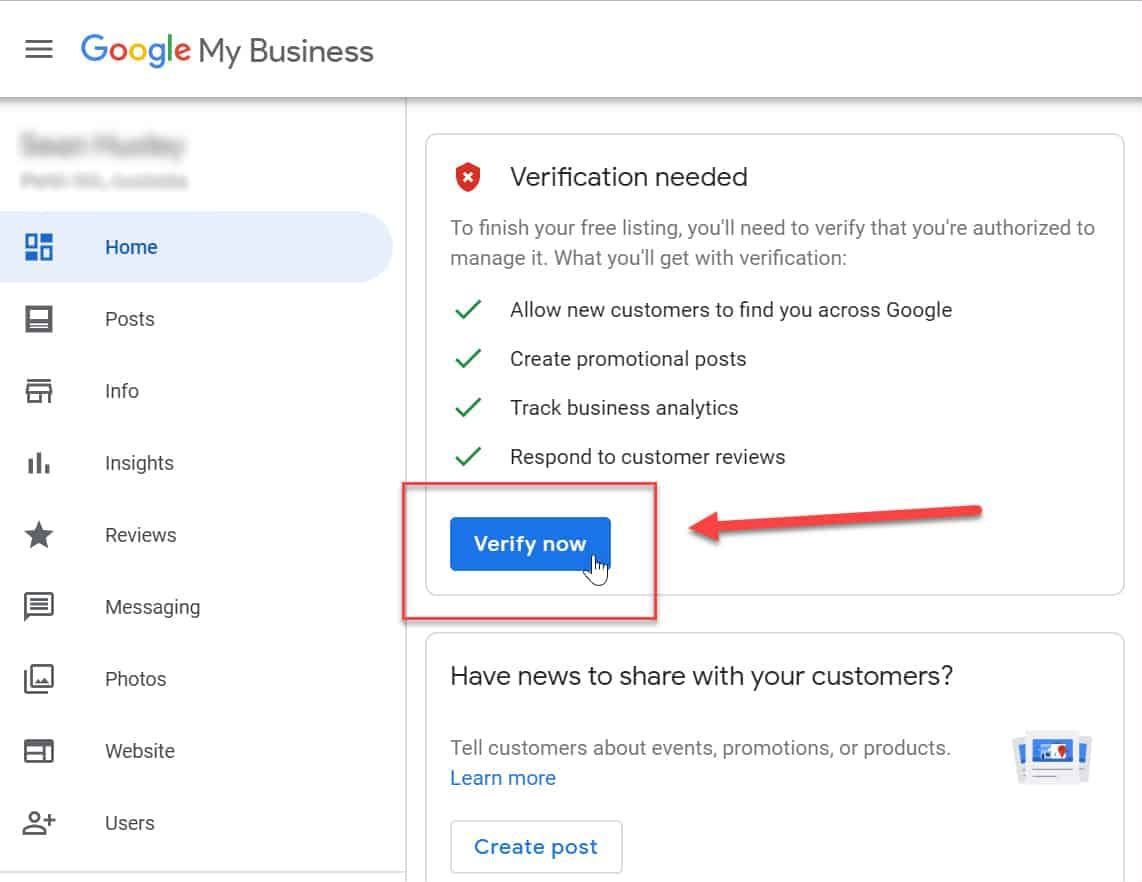
After claiming the profile, complete verification before moving on to the rest of this Google Business checklist. Many edits will not go live until then.
The Core Google Business Profile Checklist
Below is the essential checklist, straight from Google's guidelines:
| Profile Field | What Google Requires | Common Mistake |
|---|---|---|
| Business name | Your real-world name, as shown on signage and stationery | Adding keywords or city names |
| Address or service area | A precise address, or a service area with the address hidden | Using a virtual office or PO box |
| Hours | Regular customer-facing hours, with special hours for holidays | Changing regular hours for a single holiday |
| Phone | A local number tied to that location, under your direct control | Call center or tracking numbers that redirect |
| Website | A page that represents that specific location | Linking to a social media page |
| Description | Up to 750 characters, no URLs or HTML | Filling it with sales and promotions |
Business Name
Your name should be the same as what you have on your building and invoices. Google does not permit the addition of taglines, phone numbers, locations, or service descriptions in the name.
"Smith Plumbing" is good. "Smith Plumbing Best Knoxville Plumber 24/7" is not allowed and violates Google's guidelines for every profile.
Google Business Profile Categories
Google Business Profile categories are more impactful than most owners realize. You get one primary category and up to nine secondary categories.
- Choose the most specific primary category that describes your business, not what your business sells.
- Add secondary categories only for services you actually provide.
- Avoid using categories as keywords and/or as a feature description.
- Avoid broad terms like "Contractor" and change them to "Roofing contractor."
Hours and Special Hours
Use normal hours, then add special hours for local closures and holidays instead of changing the normal hours (as Google's guidelines stipulate).
Google Business Profile Optimization Checklist: Content That Helps You Stand Out

With the foundations in place, the rest of this checklist focuses on giving customers reasons to choose you.
Description and Services
In 750 characters, explain what you do, what makes you different, and how long you have been in business. Google requests that you keep promotions, prices, and links out of the description. Make a list of each service so that searchers can see what you offer.
A Powell roofer, for example, can mention serving Powell, Halls and Clinton without listing every town in East Tennessee.
Photos and Videos
Google suggests a logo, cover photo, and crystal-clear images of your shop front, products, and services. Here, the technical requirements are important:
| Media | Google's Requirement |
|---|---|
| Photo format | JPG or PNG |
| Photo file size | 10 KB to 5 MB |
| Photo resolution | 720 x 720 px recommended, 250 x 250 px minimum |
| Video length | Up to 30 seconds |
| Video file size | Up to 75 MB, 720p or higher |
Google Business Profile Posts
Posts let you share offers, recent projects and events directly on your profile. Keep them short, add a photo and a button, and post a few times a month. Posts will not lift your rankings on their own, but they show customers your business is active.
Reviews | What Google and the Law Allow
Good intentions can get in the way of good rules, and reviews are no exception. Wondering how to optimize Google Business Profile reviews? Ask all customers for reviews, respond to all reviews, but do not pay for reviews.
Fake reviews are no longer just a Google policy issue; they're a federal issue. In August 2024, the Federal Trade Commission (FTC) released a final rule prohibiting fake reviews and testimonials. It prohibits:
- Buying or posting fake reviews
- Giving bonuses based on positive or negative sentiment
- Undisclosed reviews from managers, staff, or their relatives
- Threats or intimidation to get rid of negative reviews
A consistent reputation management program ensures reviews come in properly.

Common Google Business Profile Mistakes
At the profile level, many East Tennessee businesses make the same mistakes. Here are the issues you'll want to keep an eye out for on this Google My Business checklist (the older name for the profile):
- Creating more than one profile for the same location
- Mentioning a home address as a retail location when you have no intention of dealing with customers at that address
- Variations in business names, addresses, or phone numbers on Google, Yelp, Apple Maps, and/or directories
- Not responding to reviews for months and months
Without consistent listings, the other steps in your Google Business Profile checklist will not work as well. That is why many owners turn to a local listing management service to keep listings consistent. Pair your profile with a strong website SEO strategy.
Your 15-Minute Monthly Routine
So, how to optimize Google Business Profile results long term? Don't treat this checklist as a one-time task; make it a monthly routine. In East Tennessee, steady upkeep usually beats one big push. Once a month:
- Reply to new reviews
- Add 3 to 5 new photos
- Publish one or two posts
- Check that hours and contact details are still correct
- Review calls, direction requests and website clicks in your Performance report
- Check for suggested edits and duplicate listings
FAQ's
How do I optimize my Google Business Profile?
Verify your profile, use your real business name, choose the right categories, keep hours accurate, upload real photos, collect and answer reviews, and keep your details consistent everywhere. Then review it every month.
Is Google Business Profile the same as Google My Business?
Yes. Google renamed Google My Business to Google Business Profile. Many people still search for the old name, so a Google My Business checklist and a Google Business Profile checklist cover the same thing.
How long does it take to see results from Google Business Profile optimization?
It varies. Corrected details and new photos can show up quickly. Ranking changes depend on your competition, reviews and consistency, so expect weeks to months rather than days.
Should I optimize my profile myself or hire a Knoxville agency?
You can do the basics yourself with this checklist. An agency helps when you lack time, have duplicate or inconsistent listings, or want reviews and listings managed for you.
Final Thoughts
Accurate, complete, up-to-date information is the foundation of a strong profile. Go through this Google Business Profile optimization checklist once, and then review it every month to add photos, reply to reviews, and update hours and categories.
Cutting Edge Marketing, a Knoxville digital marketing agency with 17 years of local experience, offers a free digital audit of your Google ranking, website performance, and online reputation.
Want to know how your profile measures up? Schedule your complimentary audit today.